


Как покупать товары в Америке в 2026 году
Онлайн-покупки в США – это не только удобно, но и действительно выгодно. Одежду, обувь и технику в американских магазинах часто можно купить по ценам заметно ниже, чем в России и других странах СНГ, особенно во время распродаж.
Тем, кто только начинает разбираться в зарубежном шопинге, процесс может показаться сложным или даже пугающим. На практике все гораздо проще: заказывать товары из магазинов США с доставкой в Россию, Беларусь и другие страны не сложнее, чем делать покупки в привычных онлайн-магазинах.
Эта статья для тех, кто еще ни разу не покупал в американских интернет-магазинах, но давно хотел попробовать. Мы покажем, что шопинг в США – это просто, понятно и действительно выгодно.
13.01.2026
3340 просмотров

Шаг 1. Как все работает?
Для того чтобы совершить покупки в США, а получать их в вашей стране, прежде всего, необходимо выбрать компанию-посредника.
Мэйлфорвардинг (или «ваш адрес за рубежом», посредник) – услуга, при которой вы самостоятельно совершаете покупки и используете адреса складов компании-посредника за рубежом.
Pochtoy.com является мейлфорвардером, который предоставляет каждому клиенту бесплатный персональный адрес в США для приема, хранения и дальнейшей отправки ваших покупок.
Все просто: достаточно пройти быструю регистрацию у нас на сайте, заполнить профиль и получить ваш персональный адрес в США!
А также у нас есть услуга “Покупка с оператором”, наши профессиональные сотрудники могут выкупить товар за вас, если у вас нет зарубежной карты.
Самое время приступать к оформлению первых покупок в магазинах США!
Шаг 2. Что надо для оформления заказов в магазинах США?
Прежде всего, для того чтобы делать покупки в США самостоятельно, необходимо иметь личную платежную карту для оплаты покупок. Американские магазины принимают карты Visa или Mastercard. Но важно, чтобы ваша была выпущена не санкционным банком. Если у вас есть активный зарубежный аккаунт PayPal, вы можете использовать его для оплаты. Обратите внимание: российские аккаунты PayPal в настоящее время не работают, поэтому необходимо использовать PayPal, зарегистрированный в другой стране.
Для покупки товаров в американских интернет-магазинах мы рекомендуем открыть долларовую карту в иностранном банке – в этом случае вы делаете оплату сразу в долларах и не теряете ничего на конвертации. Хотя, разумеется, вы можете делать покупки и картой в валюте вашей страны и пополнить баланс в личном кабинете тенге или белорусскими рублями (актуально для Казахстана и Беларуси). Главное, чтобы у карты была открыта возможность совершения покупок в интернете (можно уточнить у вашего банка).
Для покупки с оператором достаточно будет карты российского банка, которой вы можете пополнить баланс вашего личного кабинета. Также вы можете пополнить ваш баланс криптовалютой.
Шаг 3. Как и где покупать?
В США огромное количество магазинов, где можно найти буквально все, что угодно. На нашем сайте вы найдете список популярных вариантов для начала, но вы не ограничены – можно заказывать из любого магазина по вашему выбору.
Процесс оформления заказа в американских интернет-магазинах, как правило, выглядит так:
- регистрация (почтовый ящик и пароль)
- ввод адреса доставки (указанного вами адреса нашего склада)
- добавление платежной информации (данные вашей карты)
- выбор товаров и оплата
- ожидание отправки заказа на склад
Обычно магазин отправляет посылку на наш склад в течение нескольких дней. Подробные пошаговые инструкции по оформлению заказов в конкретных магазинах вы можете найти здесь. В целом, процесс одинаков практически во всех американских интернет-магазинах.
В конце статьи мы рассмотрим примеры того, как сделать заказ в Amazon и Macy’s.
Шаг 4. Заказ в магазине оформлен, что же дальше?
По сути, самое сложное и страшное уже позади. Теперь осталось только дождаться когда магазин (продавец) отправит заказ и предоставит трекинг-номер для отслеживания посылки по США.
Где можно отслеживать треки (посылки по США)?
99% всех покупок, оформленных в магазинах США, отправляются тремя крупнейшими в Америке службами доставки:
- USPS — государственная почтовая служба США (United States Postal Service);
- UPS — американская коммерческая компания (United Parcel Service);
- Fedex — еще одна коммерческая служба доставки (Federal Express).
Если же магазин отправил ваш заказ какой-то другой службой, то вы всегда сможете отследить заказ в аккаунте магазина.
После того как магазин (продавец) предоставил трекинг номер, необходимо внести его в ожидаемые посылки у нас. Как только посылка будет принята складом, она появится у вас в личном кабинете (об этом придет SMS уведомление или письмо на вашу почту).
Шаг 5. Посылка на складе, что теперь?
Здесь есть два варианта.
- Сразу после получения первого заказа на склад сформировать посылку к отправке;
- Дождаться других ваших покупок и объединить их все вместе в одну посылку (консолидировать).
Консолидация – это объединение нескольких посылок (заказов) в одну общую посылку.
Второй вариант можно назвать более выгодным, так как чем больше будет вес вашей посылки, тем выгоднее условия доставки. Здесь нужно учитывать, что у всех служб доставки без исключения самый дорогой по стоимости всегда первый килограмм, а каждый последующий уже существенно дешевле.
Первый же способ (отправка сразу) мы рекомендуем в том случае, если вы больше ничего не планировали покупать в ближайшее время и объединять несколько заказов в одну посылку вам не требуется.
Шаг 6. Посылку надо отправить, но как?
Прежде всего необходимо выбрать службу доставки. Предварительно рассчитать стоимость доставки и определиться со службой доставки можно в нашем калькуляторе доставки. Подробно прочитать о каждой службе доставки, ограничениях по максимальному весу и так далее можно в разделе вопросов и ответов.
Определившись со службой доставки, можно приступать к оформлению посылки и ее отправки на сборку.
Когда посылки поступили на склад (все, которые вы хотите сейчас отправить) и появились на вкладке Покупки на складе, вам нужно отметить посылки и добавить их в формируемую посылку (кнопка «Добавить в посылку»).
Шаг 7. Заключительный и самый приятный
После того, как посылка будет отправлена со склада, рядом с ней появится международный трекинг номер, по которому можно отслеживать движение посылки. После того, как посылка будет доступна к получению вы получите оповещение (уведомление с почты в вашем почтовом ящике или смс сообщение о выдаче посылки курьеру, например). Для получения посылки при себе необходимо иметь документы, удостоверяющие личность (паспорт).
Мы рекомендуем проверять содержимое посылки и целостность товаров при операторах почты либо сотрудниках службы доставки. После проверки посылки, забираете посылку домой и радуетесь вашим новым покупкам!
Как видно из этой статьи, покупать в США с доставкой в Россию, Беларусь (и другие страны) действительно просто и легко. Если же какие-то моменты остались для вас непонятны, вы всегда можете задать интересующие вопросы в тикетах в вашем личном кабинете либо оператору в онлайн чате.
А теперь рассмотрим подробнее как сделать заказ на Amazon
Как зарегистрироваться на Amazon
- Открываем в браузере сайт Amazon
- В правом верхнем углу страницы наведите на «Hello. Sign In Account&Lists». В появившемся меню кликните на ссылке «Sign here»
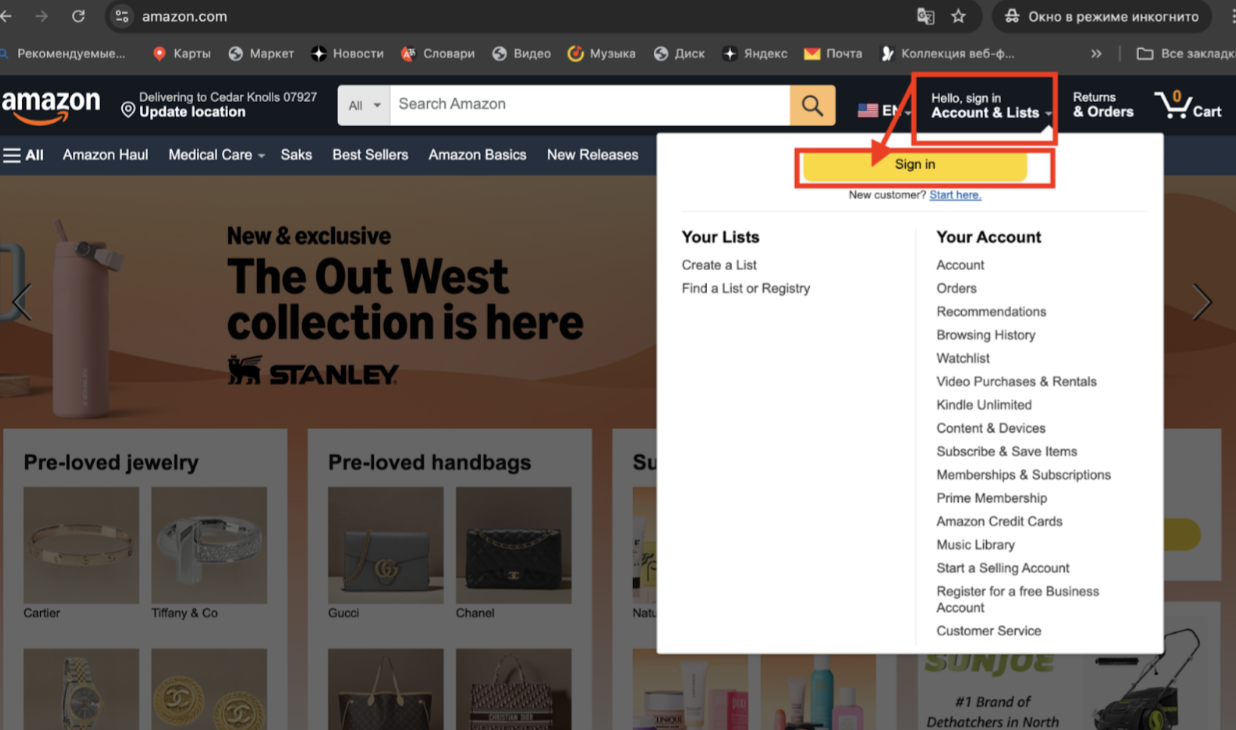
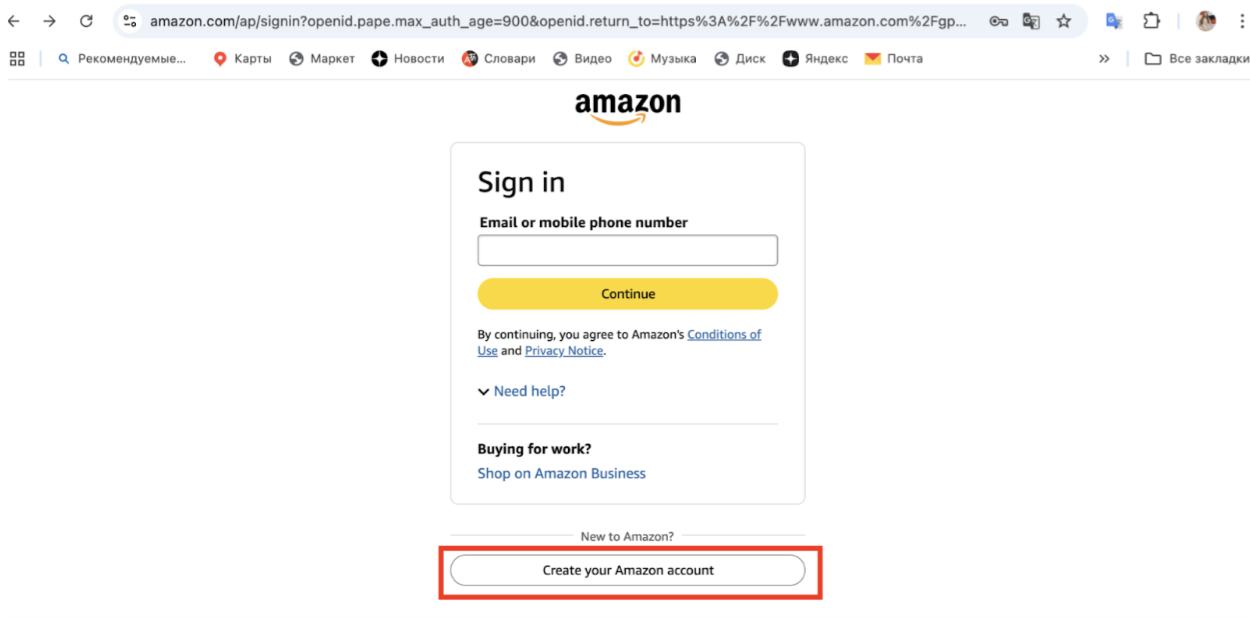
- После этого в открывшемся окне вам нужно пройти регистрацию.
Нажмите на кнопку “Create your Amazon account”
- Далее вам нужно ввести ваши данные
Введите имя, фамилию на латинице. Рекомендуем вводить не номер телефона, так как российские номера могут быть заблокированы для отправки уведомлений, а именно почтовый ящик (также лучше выбирать не российские домены mail и яндекс, а, например, международный gmail). Также нужно придумать пароль и повторить его.
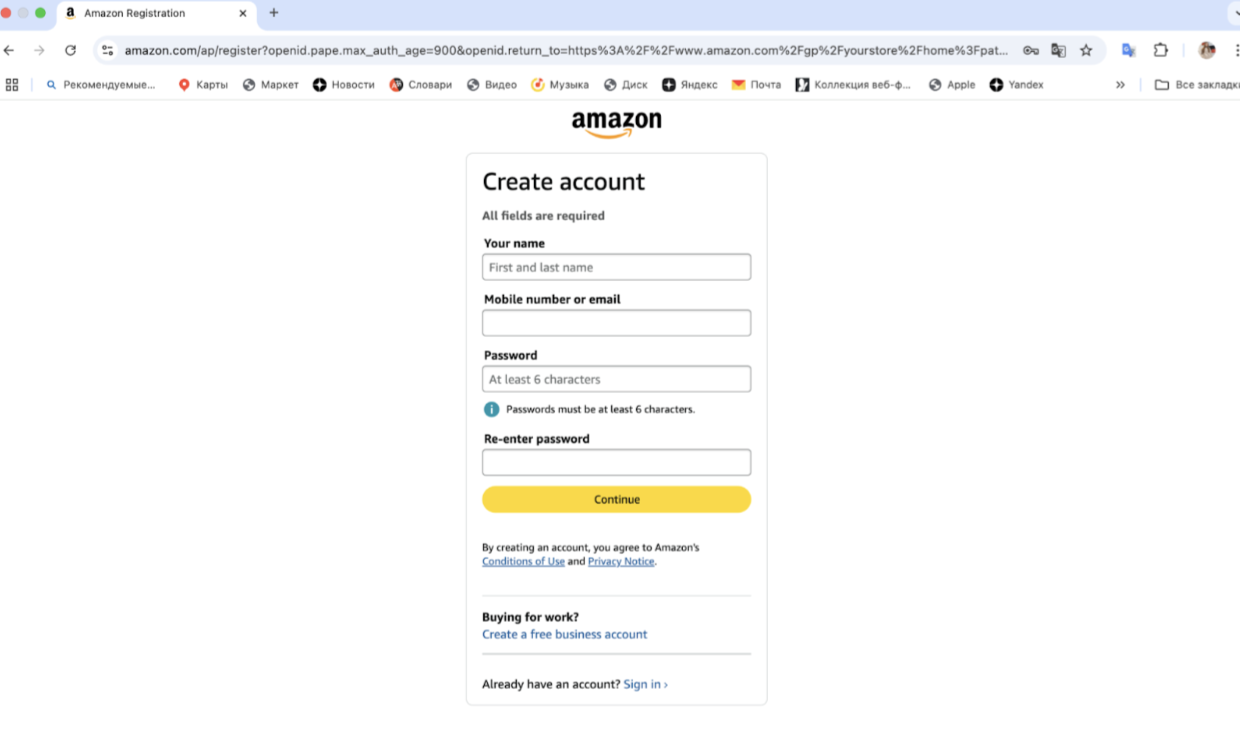
Нажмите на кнопку Continue
- После этого необходимо пройти верификацию вашего почтового ящика
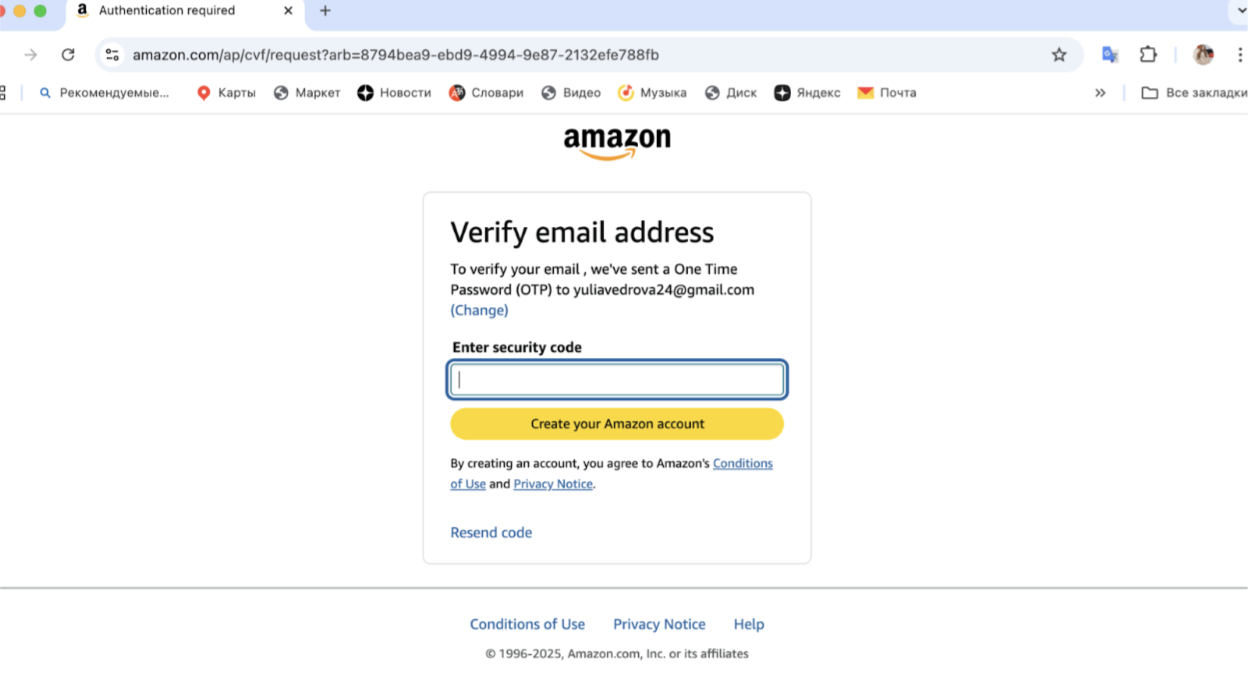
Проверьте почту и введите OTP код в пустое поле.
Когда код будет подтвержден, вы получите доступ к покупкам! Теперь вы полноправный зарегистрированный покупатель Amazon. Поздравляем!
Поиск товаров на Amazon и их покупка
- Поиск товара можно осуществлять как по разделам (books, electronics), так и по названию или бренду - для этого достаточно воспользоваться строкой Search.
В качестве примера рассмотрим приобретение отличного подарка и самой модной кружки Stanley.

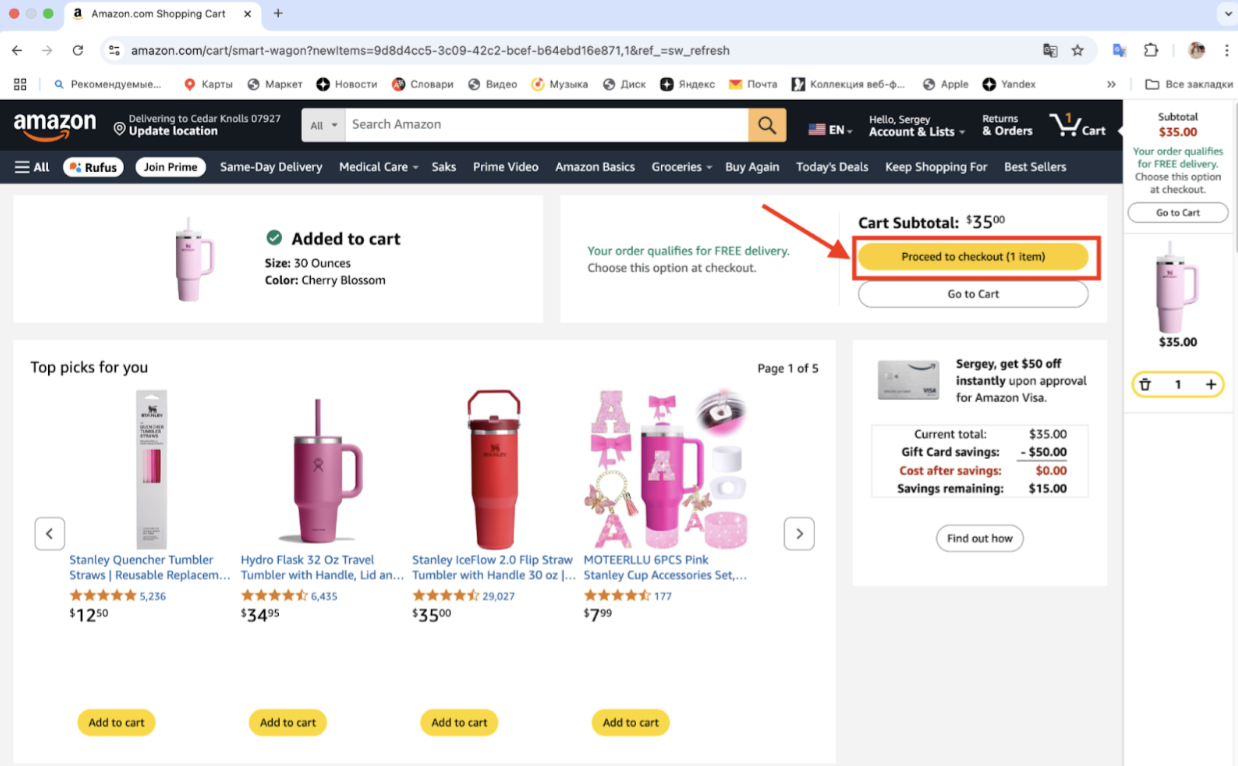
В правой части страницы товара есть заметная желтая кнопка «Add to cart», нажав на которую понравившийся вам товар моментально добавляется в корзину.
Итак, смело жмем кнопку и переходим к обзору того, что мы собираемся купить.
- Далее проверяем сумму покупки, цвет и нажимаем на кнопку “Proceed to checkout (1 item)”
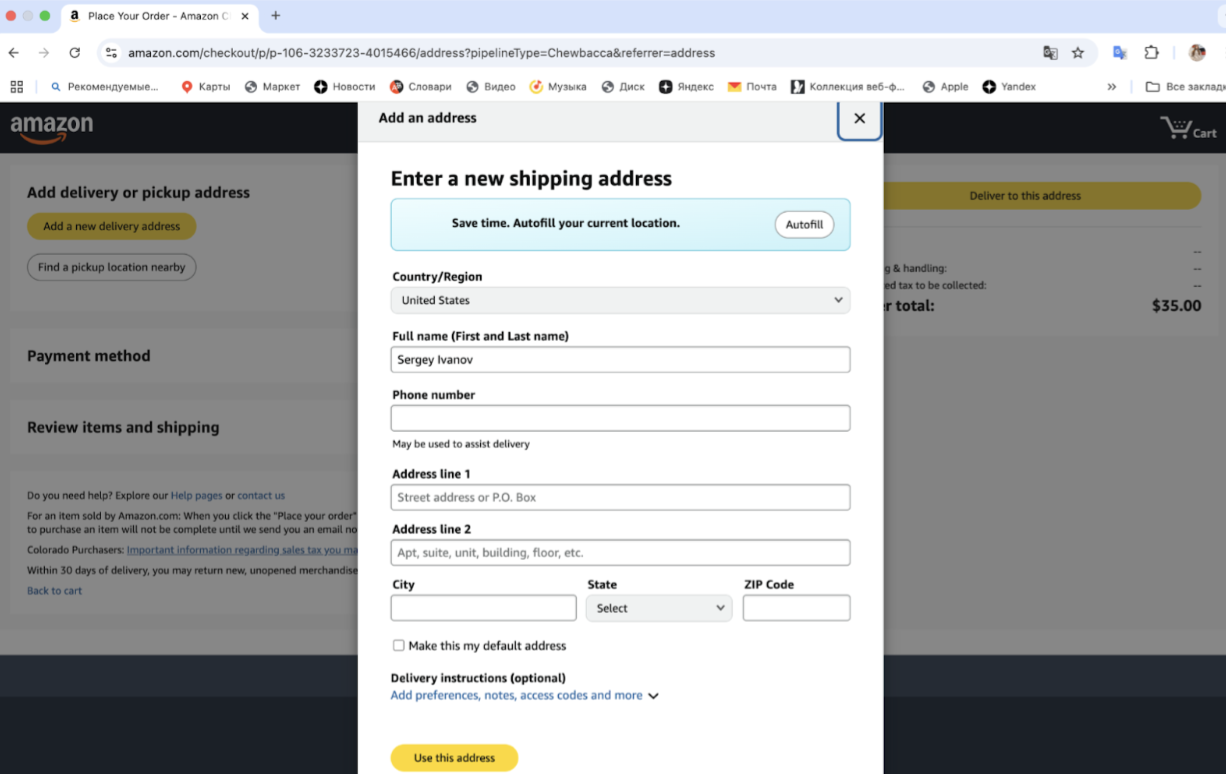
- Теперь приступаем к оформлению адреса доставки. Нажимаем на кнопку “Add a new delivery address”

- В открывшемся окне нужно ввести адрес склада в вашем личном кабинете в нашем сервисе.
Это тот самый адрес для доставки ваших покупок, который вы получили у нас. Заполняем форму shipping address. Все поля очень важно заполнить правильно и полностью.
Пример заполненных полей адреса:
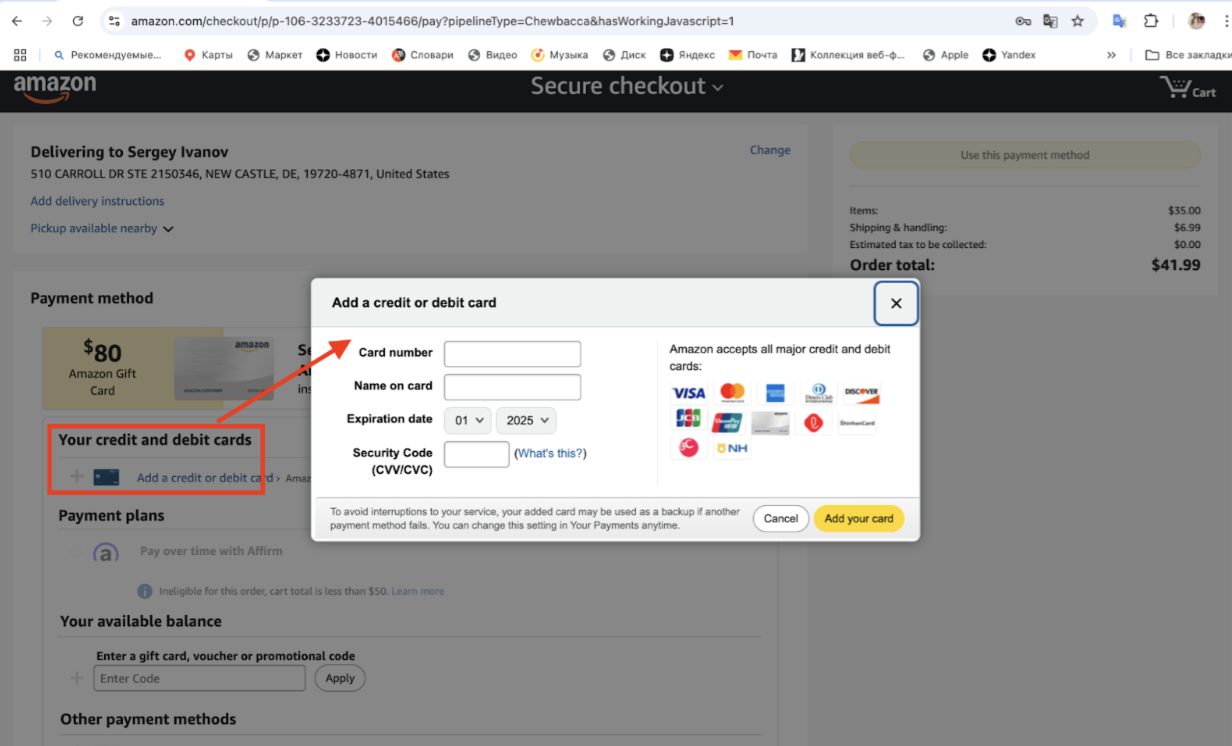
- Вы почти закончили! В открывшемся окне осталось только ввести данные вашей иностранной карты.
Вводите номер, имя владельца, период действия и CVC код с обратной стороны карты. Нажмите в конце Add your card.
- После этого нажимаете Use this payment method и все! Готово! Ваш заказ размещен на Амазоне, скоро будет обработан и поступит на наш склад.
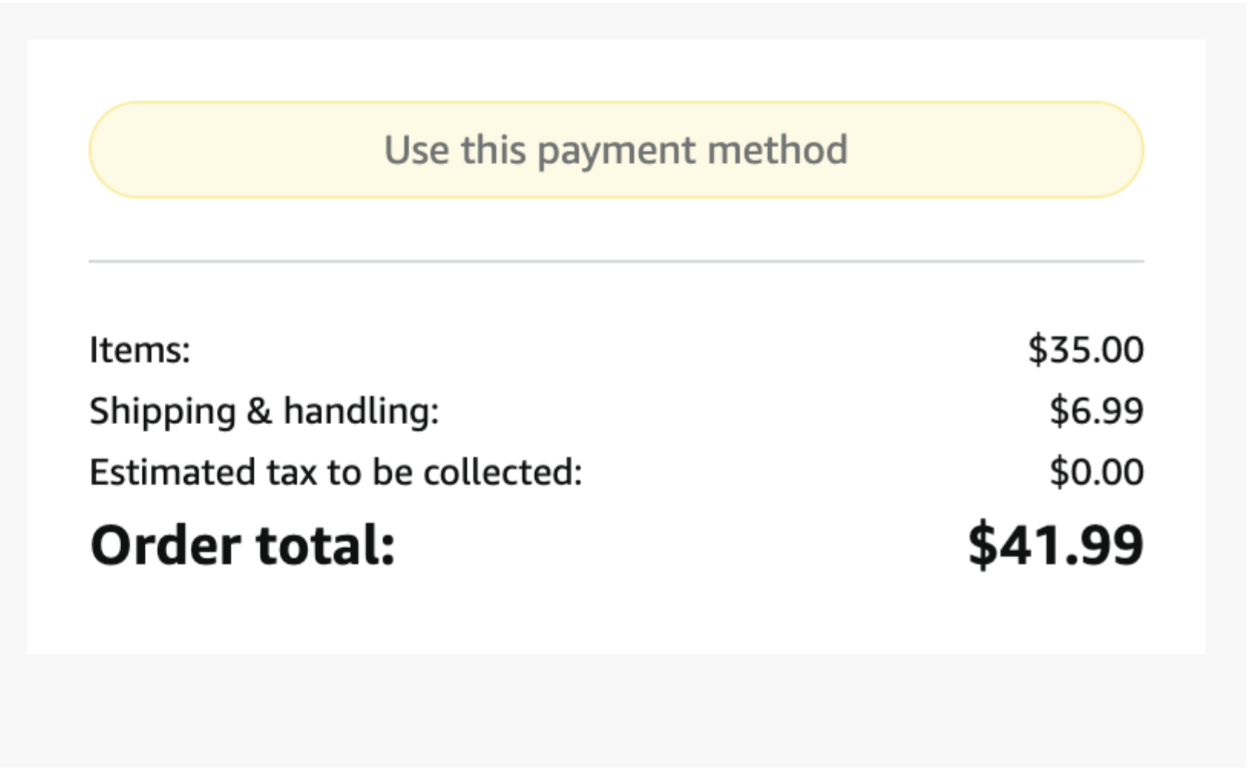
Все передвижения вашего товара вы можете отследить в вашем личном кабинете. Удачного шопинга в Amazon!
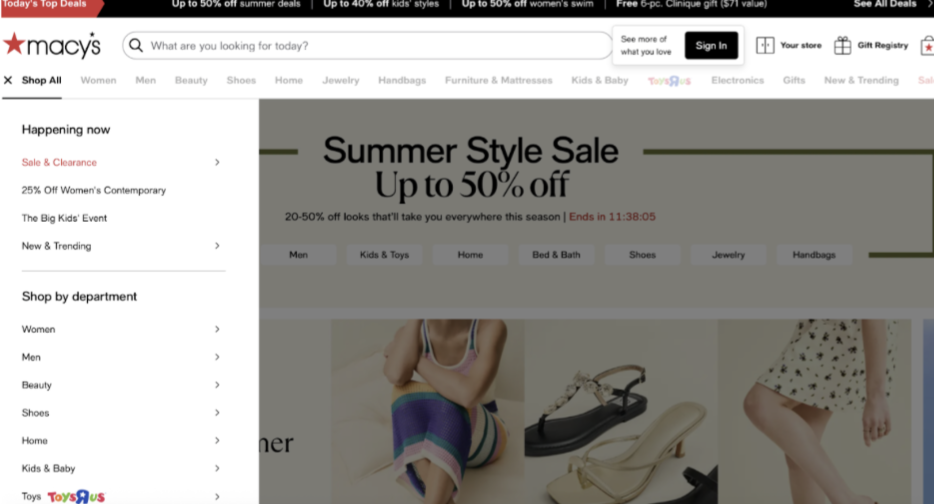
Как сделать заказ на Macy’s
Перейдите на https://www.macys.com
-
После регистрации вы получите:
- Удобный доступ к заказам
- Эксклюзивные скидки
- Участие в программе Star Rewards (при использовании Macy’s Credit Card)
Выбор товаров
- В верхнем меню выберите нужный раздел:
Women, Men, Juniors, Kids, Shoes, Handbags, Home и др.
- Используйте фильтры по бренду, размеру, цвету, цене.
- На странице товара:
- Ознакомьтесь с отзывами
- Выберите нужный размер и цвет
- Нажмите Add to Bag
У Macy’s часто действуют промо-коды. Если товар с пометкой "Extra % off with code", не забудьте применить купон на этапе оформления заказа.
Корзина и проверка заказа
- После выбора товаров нажмите значок корзины в верхнем углу → View Bag & Checkout
- Убедитесь, что:
- Цвет и размер указаны верно
- Товары доступны к доставке
- Нажмите Checkout
Промокод и купоны
- Введите промокод в поле Promo Code (если есть).
- Нажмите Apply — скидка отобразится в корзине.
Macy’s часто публикует коды на главной странице, в слайдерах, или присылает на email.
Оплата
Методы оплаты:
- Кредитные и дебетовые карты (Visa, Mastercard, Amex)
- PayPal
- Macy’s Gift Card
- Macy’s Credit Card (если есть)
Введите:
- Номер карты
- Имя владельца
- CVV и срок действия
- Billing address (может совпадать с адресом доставки)
При использовании PayPal откроется отдельное окно для подтверждения, очень важно учитывать, что PayPal можно использовать только если он выпущен за пределами РФ и Беларуси.
Покупки в США с доставкой в Россию и Беларусь – это действительно просто, если понимать основные шаги и заранее учитывать правила доставки. Попробуйте оформить первую посылку и убедитесь, что шопинг в США может быть удобным, понятным и выгодным. А мы вам поможем!


